What You’ll Learn
In this guide, you’ll learn how to manage Small Business Reviews in SBCX as a Small Business Specialist (SBS). You’ll see how to:
- Understand your role and responsibilities in the review process.
- Access and navigate reviews assigned to you.
- Review project details, uploaded documents, and prior comments.
- Provide feedback, request revisions, or approve reviews.
- Use workflow actions to route reviews to the next step.
- Apply tips and best practices to ensure efficient, accurate reviews.
TABLE OF CONTENTS
1. Your Role in Small Business Reviews
2. Where to Find Your Assigned Reviews
1. Your Role in Small Business Reviews
Small Business Reviews are initiated to evaluate market research and acquisition strategies from a small business perspective.
What You Can Do as an SBS
- Access reviews routed to you by contracting officers or program staff
- View project details, documents, and prior comments
- Provide comments or request revisions
- Approve the review or assign it to another reviewer
Need help understanding the tabs and views?
See Conduct a Small Business Review
Workflow Actions You Can Take
Once a review reaches you:
- Approve – Move the review to the next assigned role or finalize
- Request Revision – Send the review back with comments
- Request a Comment – Ask a clarifying question
- Assign to Another Reviewer – Reassign the next step
Each review record is divided into three tabs:
| Documents | Files uploaded by the initiator |
| Summary | Acquisition and market research details |
| Status | Full workflow history, approvals, and comments |
2. Where to Find Your Assigned Reviews
Go to the Small Business Reviews tab from the main menu.
Use these views to locate your work:
My Reviews – Open reviews assigned to you
All Reviews – Finalized reviews for your division
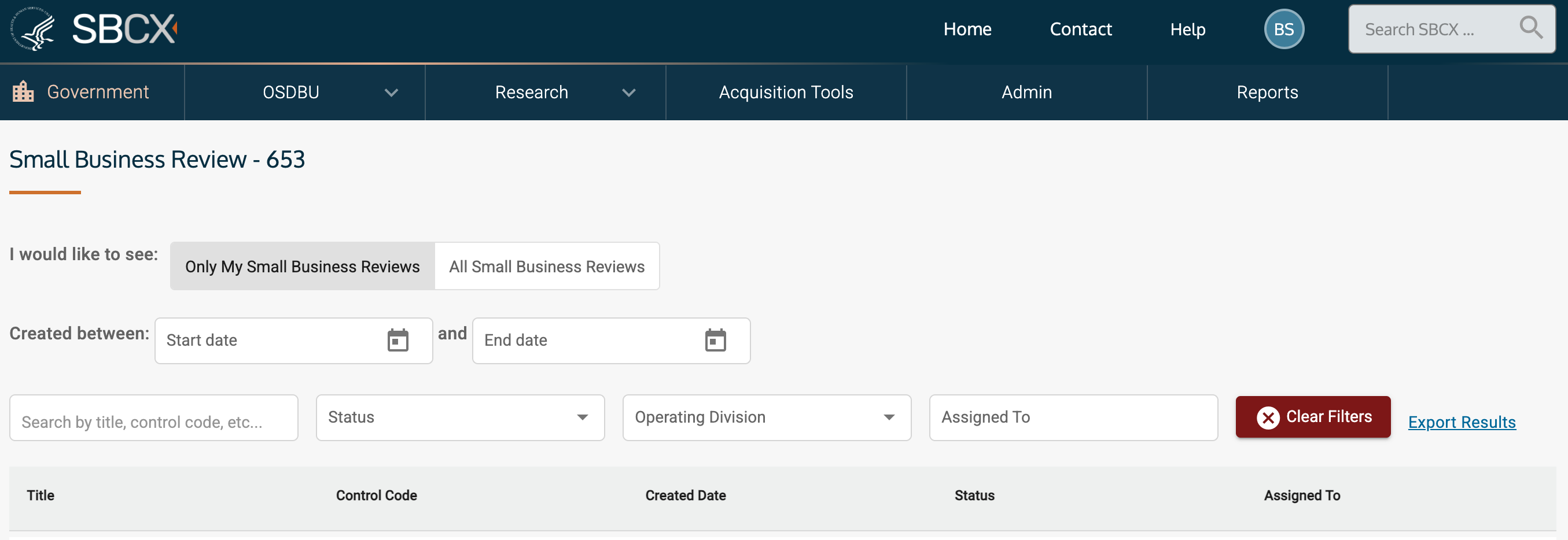
Figure 1. Small Business Review Interface
3. Tips and Best Practices
- Always use the Request Revision option rather than email for documentation tracking
- Check your My Reviews regularly to avoid delays
- Document reasons for revision requests clearly in the Status tab
- Once approved, reviews route automatically to the next stakeholder
4. Reports
To find the number of Small Business Reviews in a specified time frame:
- Go to the Reports section of SBCX.
- Click on "Small Business Reviews" in the left navigation menu.
- Change the start date to the start of the last fiscal year (or your preferred start date).
- Change the end date to the end of the last fiscal year (or your preferred end date).
- Once you tab away or press return in the end date box, the screen will refresh the data based on the dates.
- Right-click on a row to export the report.
Understanding the Average Number of Days in each Status
| Status | Definition |
|---|---|
Average days for initial submit | Average number of days from when the initial author (CS or CO) creates the review to when the initial author submits the review to the next reviewer (Status changes from New to CO Review or SBS Review) |
CO submits to SBTA | Average number of days from when a review is submitted by a CO (to a SBTA user) to when the review is approved/submitted by the SBTA (status changes from CO Review to SBTA Review) |
CO submits to SBS | Average number of days from when a review is submitted by a CO (to a SBS user) to when the review is approved/submitted by the SBS (status changes from CO Review to SBS Review) |
SBTA submits to SBS | Average number of days from when a review is submitted by an SBTA (to a SBS user) to when the review is approved/submitted by the SBS (status changes from SBTA Review to SBS Review) |
SBS submits to SBA | Average number of days from when a review is submitted by a SBS (to a SBA user) to when the review is approved/completed by the SBA (status changes from SBS Review to SBA Review) |
SBS completes | Average number of days from when a review is submitted to a SBS to when the SBS approves it (status changes from SBS Review to Complete) |
SBA completes | Average number of days from when a review is submitted to a SBA to when the SBA approves it (status changes from SBA Review to Complete) |
Definition of Acronyms
| Acronym | Definition |
| CO | Contracting Officer |
| CS | Contract Specialist |
| OPDIV | Operating Division |
| SBA PCR | Small Business Administration Procurement Center Representative |
| SBS | Small Business Specialist |
| SBTA | Small Business Technical Advisor |
Related Articles
Need Help?
Submit a help desk ticket or email us at: client.support@apexlogic.com if:
You’re unable to access your assigned reviews
You believe your user role needs updating
You’re experiencing errors with approval workflows
Was this article helpful?
That’s Great!
Thank you for your feedback
Sorry! We couldn't be helpful
Thank you for your feedback
Feedback sent
We appreciate your effort and will try to fix the article